PDF Parsing
Built for RAG
Extract structured data for RAG pipelines. Reading order, tables, bounding boxes — top-ranked in benchmarks. Local-first. Open source.
PDFs Weren't Built for AI
Lost structure, broken tables, missing accessibility tags — the tool you choose determines 90% of your pipeline's output quality.
"If the data isn't parsed properly, your RAG system will never retrieve accurate answers. Garbage in = garbage out."
Scrambled Reading Order
Multi-column layouts read left-to-right across the page, mixing content from different columns. Your LLM receives jumbled text that makes no sense.
Lost Table Structure
Tables become walls of unformatted text. Row and column relationships disappear, making financial data and specifications unusable.
No Source Coordinates
No way to cite where information came from or highlight the original PDF location. Users can't verify your AI's answers.
Accessibility Non-Compliance
EAA, ADA, Section 508 enforced worldwide. Manual PDF remediation doesn’t scale.
Built for RAG, Not Just PDF Reading
OpenDataLoader PDF delivers what LLM pipelines actually need.
XY-Cut++ Reading Order
Correctly reads multi-column layouts. Text flows in the order humans read it.
How it worksHybrid OCR & AI
Optional LLM enhancement for OCR and complex tables. 93% table accuracy in benchmarks.
Enable hybridTable Extraction
Detects borders and clusters text into rows/columns. Handles merged cells.
Table schemaAuto-Tagging to Tagged PDF
Open-source PDF auto-tagging pipeline. Untagged PDF in → screen-reader-ready Tagged PDF out. Based on PDF Association specifications, validated with veraPDF.
Learn moreStructured Output with Bounding Boxes
JSON Output Example
{ "type": "heading", "id": 42, "level": "Title", "page number": 1, "bounding box": [72.0, 700.0, 540.0, 730.0], "heading level": 1, "font": "Helvetica-Bold", "font size": 24.0, "content": "Introduction"}| Field | Description |
|---|---|
| type | Element type: heading, paragraph, table, list, image, caption |
| id | Unique identifier for cross-referencing |
| page number | 1-indexed page reference |
| bounding box | [left, bottom, right, top] in PDF points |
| heading level | Heading depth (1+) |
| font, font size | Typography info |
| content | Extracted text |
Bounding Box Visualization
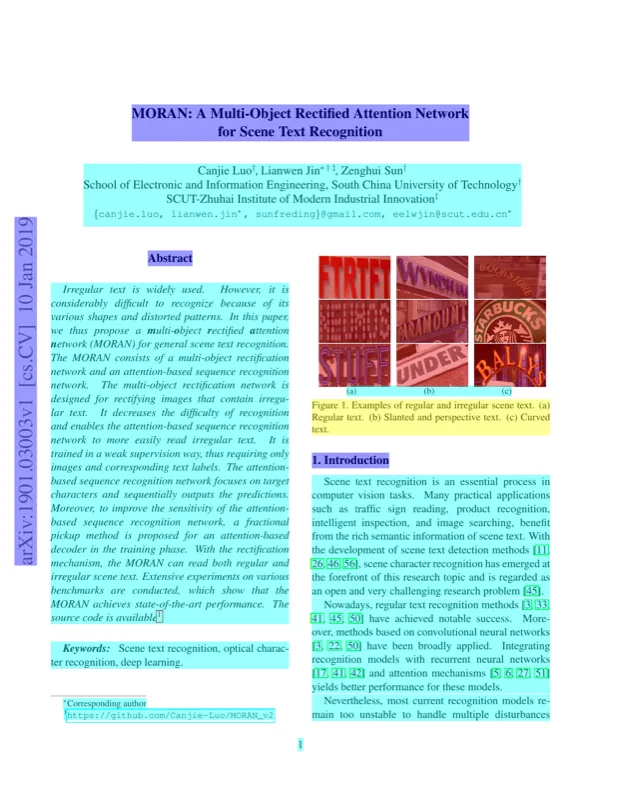
Why Bounding Boxes Matter for RAG
When your LLM answers a question, bounding boxes let you:
- Highlight the exact source location in the PDF
- Build citation links with page and position references
- Verify extraction accuracy by visual comparison
Why OpenDataLoader PDF?
Benchmark Comparison
Overall Score
#1 in benchmarks — per-document mean of available metrics
Speed (s/page)
Lower is faster — full pipeline including layout analysis
Reading Order (NID)
Text sequence accuracy
Table Score (TEDS)
Table extraction accuracy
Heading Score (MHS)
Heading detection accuracy
Get Started in 60 Seconds
pip install -U opendataloader-pdfimport opendataloader_pdfopendataloader_pdf.convert( input_path=["document.pdf"], output_dir="output/", format="json,html,pdf,markdown")Building a RAG pipeline?
Use our official LangChain integration:
pip install -U langchain-opendataloader-pdfTagged PDF & PDF/UA Accessibility
Open-source PDF auto-tagging pipeline. Based on PDF Association specifications, developed with Hancom and Dual Lab (veraPDF developers).
Accessibility regulations are enforced worldwide (EAA June 2025, ADA/Section 508, Korea Digital Inclusion Act). Manual PDF remediation doesn't scale.
Accessibility Pipeline
Audit
Check existing PDF tags, detect untagged PDFs
Auto-tag
Generate structure tags for untagged PDFs
Export PDF/UA
Convert to PDF/UA-1 or PDF/UA-2 compliant files
Visual Editing
Accessibility Workspace — review and fix tags
Ready to Parse PDFs
the Right Way?
One command to get started. No API keys, no cloud, no hassle.
pip install -U opendataloader-pdf

